WAFF 48 First Alert Weather
Gray MediaWeather
4.61.79K Reviews
- Version
- 6.2.512
- Installs
- 100.00K
- Age Rating
- Everyone
Screenshots
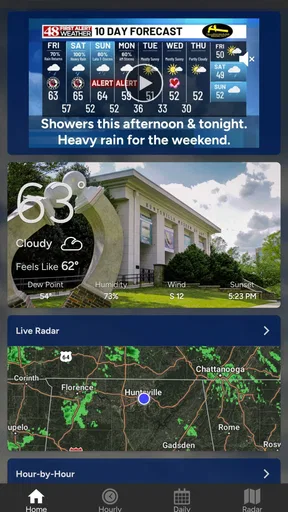
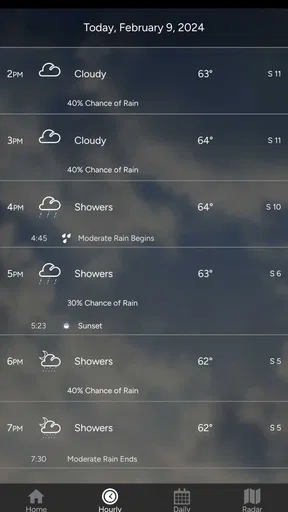
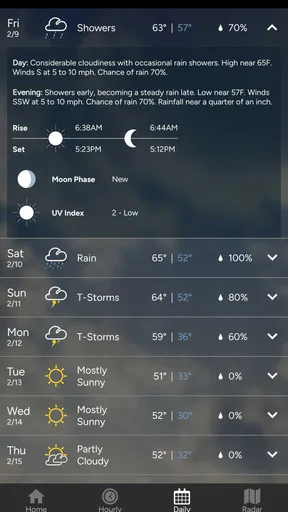
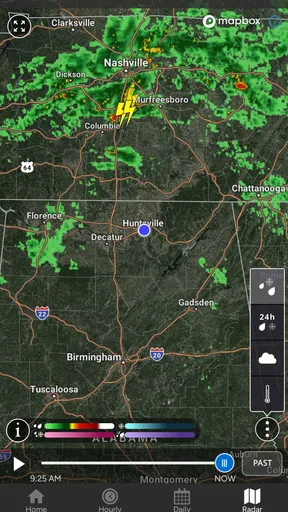
Our Review of WAFF 48 First Alert Weather
 Analysis by Appyee
I use weather apps for very ordinary decisions: whether to leave early, if a child needs a rain jacket, or whether a weekend plan is worth keeping. WAFF 48 First Alert Weather is built for that kind of quick, local check. It is a free weather app from Gray Media, connected to the WAFF 48 news brand, and its focus is clearly practical rather than decorative.
After spending time with it, I found the app easiest to appreciate when I treated it as a local weather companion instead of a replacement for every weather tool on my phone. It gives the WAFF 48 audience a direct way to check conditions, follow changing weather, and make short-term plans without opening a full news website. The experience is straightforward, but its usefulness depends heavily on whether you live in the area it serves or regularly need weather information there.
How WAFF 48 First Alert Weather Fits Into a Daily Routine
I use a daily weather check to make a small decision, not to study the forecast: should I adjust the time I leave, pack a layer, or reconsider an outdoor plan? WAFF 48 First Alert Weather fits that quick routine best when the place I care about is within its local orbit. In the next section, I’ll focus on the practical checks that can make a first visit feel useful rather than confusing.
A local-first weather experience
The app belongs to the weather category, although its identity is more specific than a generic forecast utility. It comes from Gray Media and carries the WAFF 48 name, so it feels designed around the needs of that station’s audience. That local connection matters during unsettled weather, when a broad national forecast may be less helpful than information presented for the community you actually care about.
I would open it for a fast answer rather than spend time exploring menus. The most useful habit is to check it at the points when weather affects a decision: before commuting, before driving across town, before sending children outside, or before starting outdoor work. A weather app earns its place on a phone when it reduces uncertainty in those moments, and this one is shaped around that purpose.
The app is available at no cost, which makes the decision simple for someone who wants a weather tool without committing to a subscription or one-time purchase. That is the clearest value proposition here: you can try it without paying first, then decide whether its local focus fits your routine. I would not describe it as a paid product whose value needs to be justified against a purchase price. Its value comes from convenience and relevance rather than from premium ownership.
It is rated for Everyone, so it is positioned as a general household utility rather than an app aimed at a specialist audience. The current version is 6.2.512, and the app supports operating systems from version 9 onward. Those details make it a practical option for people who keep an older compatible phone in daily use, although the overall experience will still depend on the device and system environment.
What makes the free access worthwhile
Free weather apps are common, so simply costing nothing is not enough to make one useful. In my view, WAFF 48 First Alert Weather earns attention through the combination of recognizable local branding and a focused purpose. If WAFF 48 is already the weather source you trust, having its weather experience available as an app can remove a step from the routine.
The app has attracted an average rating of 4.6 from around seven thousand ratings, with roughly one thousand eight hundred written reviews. It has also passed one hundred thousand installs. Those figures suggest that it has found a real audience, but I would read them as signs of adoption rather than proof that it will be ideal for every location or every forecasting style.
One useful way to judge it is to compare the cost with the alternatives. A phone’s built-in weather widget may be faster for a single glance, while a large national weather service may be better for travel across several regions. A station-specific app can be more appealing when your decisions are local and you prefer one familiar source. Since WAFF 48 First Alert Weather is free, the trade-off is not money versus money; it is simplicity and local identity versus breadth and customization.
Everyday situations where it earns its place
Imagine a weekday morning when rain is possible and you need to decide whether to walk, drive, or leave earlier. I would use the app before breakfast, then check again shortly before leaving if the situation looks unsettled. The benefit is not merely seeing a temperature. It is having a dedicated place to make a weather decision without mixing that task into a crowded news or social feed.
Another realistic use is planning an outdoor appointment that cannot easily be moved. Instead of checking once the night before and assuming the forecast will remain unchanged, I would use the app as a repeat-check tool. A forecast is most useful when it changes what you do, so I prefer a routine of checking at the planning stage and again near the event. That approach also prevents the common mistake of treating one early forecast as a guarantee.
For families, the app can be useful as a shared reference point. One person can check conditions before school, another can look before an afternoon activity, and everyone is working from the same local weather source. I would still use personal judgement for severe or rapidly changing conditions, but the app can make ordinary coordination easier.
Outdoor workers may also find the local angle valuable. A person who spends the day moving between job sites does not need a long explanation every time; they need a quick view before starting and a reason to reassess later. The limitation is that a weather app should support planning, not replace workplace safety procedures or official emergency instructions.
Small habits that improve the experience
My first practical tip is to decide what question you want answered before opening the app. “Can I leave now?” is more useful than casually browsing every available weather detail. Looking for the immediate decision helps keep the app efficient and reduces the temptation to overinterpret minor forecast changes.
My second tip is to compare the forecast with what is happening outside when conditions are unstable. If the sky is changing quickly, treat the app as one input and keep checking rather than assuming the first screen you saw will remain accurate. This is especially important for outdoor plans, long drives, and situations where a delay would be costly.
A third useful habit is to use the app as part of a two-stage plan. Check it when arranging an activity, then check again close to departure. That workflow is more reliable than checking only at the beginning, and it makes the app’s quick-access nature more valuable. It also helps separate planning information from last-minute decisions.
Finally, I would keep a broader weather source available if I travel often. A local station app can be excellent for home, but a trip through multiple areas may require a wider map or a consistent national view. Keeping both tools does not undermine this app; it clarifies the job each one is meant to do.
Where the trade-offs become noticeable
The biggest limitation is the same feature that gives the app its identity: it is tied to WAFF 48’s local audience. If you live far from the area it serves, its usefulness may drop sharply. Someone looking for international travel planning, cross-country route weather, or a broad collection of locations may be happier with a general weather service designed around wide geographic coverage.
There is also a difference between wanting a quick local forecast and wanting a highly configurable weather dashboard. Users who enjoy comparing several forecast models, building detailed custom views, or studying weather as a hobby may find a specialized alternative more satisfying. I would choose this app for convenience, not for an advanced meteorological workspace.
Another trade-off is that a station-branded experience may feel less neutral to people who prefer to gather information from several sources. I like having a familiar local reference, but I would not rely on one app alone when weather could affect safety, travel, or a major event. In those cases, official alerts and current local guidance deserve priority.
The app’s free price is a clear advantage, but free access should not be confused with a guarantee that it will match every user’s expectations. There is no purchase decision to recover, so the sensible approach is to install it, use it during the situations that matter to you, and keep it only if it fits your location and habits. That makes the financial risk very low, while the time cost of trying it is modest.
Who should use it, and who should look elsewhere
I think the strongest audience is people who already follow WAFF 48 or want a local weather app with a familiar regional identity. It is also a good fit for households that want a simple, free tool for commuting, school routines, errands, and outdoor plans. The app makes particular sense when most weather decisions happen close to home rather than across many destinations.
It is less compelling for someone who needs a single app for frequent travel. A traveler may prefer a service that handles many locations equally well and offers a broader view of changing conditions along a route. Likewise, a weather enthusiast who wants deep customization should look for a more specialized tool instead of expecting a local station app to behave like a full forecasting laboratory.
I would also hesitate to recommend it as the only weather resource for people who need highly detailed professional planning. The app can be part of a routine, but professional or safety-critical decisions deserve more than a casual glance at any consumer weather application. That is not a criticism unique to this product; it is an important boundary for using weather software responsibly.
Getting unstuck during setup
If the app does not seem useful as soon as it opens, I would first check whether it is showing the place that matters to me. A local weather tool only helps when its location matches the decision at hand. When checking a home forecast, make sure you are not relying on a remembered destination or a location that no longer reflects your routine.
If location access is unavailable or inconvenient, I would look for a way to choose the relevant place within the app rather than assume the forecast is broken. On any phone, a location setting, connectivity, or a temporary service delay can affect what appears. Reopening the app after checking those basics is a sensible first step before changing several settings at once.
Simple recovery when information looks stale
When conditions outside do not seem to match what I last saw, I avoid making a major decision from an old screen. I refresh by closing and reopening the app, confirm that the phone has a working connection, and check again. If the mismatch matters for safety, I also consult current official guidance instead of repeatedly refreshing one source and treating that as confirmation.
This is a useful distinction: a forecast can change, but a display can also fail to update promptly because of ordinary device or network friction. I would give the app a fresh check, then compare with another trusted source if the difference affects a trip or outdoor commitment. That keeps troubleshooting practical without mistaking a temporary loading problem for a forecasting judgment.
When the phone or the weather is the real issue
Not every problem belongs to the app. Weak reception, an offline phone, an outdated location setting, or a device that is struggling can make many weather tools feel unreliable. I would test basic connectivity and confirm the phone’s date and location settings before deciding that this particular app is at fault. If other apps are also failing to load, the broader issue is probably worth addressing first.
Weather itself is another source of uncertainty. Conditions can shift between checks, especially when a plan depends on a narrow window of dry weather. I use the app to support a decision, not promise an outcome; for urgent alerts or hazardous conditions, I follow official local instructions and take appropriate precautions.
My final recommendation
WAFF 48 First Alert Weather is an easy recommendation for the right audience, mainly because the cost is straightforward: it is free to use, so there is no subscription or purchase to weigh against its benefits. The real question is whether its local focus matches where you live and how you make weather decisions.
I like it as a practical companion for quick checks, repeat checks before plans, and everyday coordination. Its strongest quality is not an elaborate feature list; it is the way a familiar local weather source can become easier to reach. The app has been available since February 4, 2011, and its continued presence, current release, broad age suitability, and audience response give it the feel of an established utility rather than a disposable experiment.
My verdict is to try it if WAFF 48 is relevant to your area. Keep it if the local perspective helps you decide faster than your current weather tool. Skip it if you need broad travel coverage, extensive customization, or a specialist forecasting experience. For local, no-cost weather checks, it delivers sensible value; for every other weather need, its usefulness depends on choosing it for the job it actually does well.
Verdict
Strengths of WAFF 48 First Alert Weather
- Accurate local forecasts for the greater Cincinnati and Northern Kentucky area.
- First Alert updates help users prepare for severe weather events.
- Radar views make it easy to track rain and storms in real time.
- Push notifications can provide timely warnings for dangerous conditions.
- Includes forecasts, video updates, and weather information in one app.
Limitations of WAFF 48 First Alert Weather
- Coverage is mainly useful for viewers within the WAFF 48 broadcast region.
- Frequent alerts may become distracting during extended severe weather.
- Some features may require location access to work properly.
- Radar and video content can use significant mobile data.
- Ad-supported screens may reduce the overall viewing experience.
Other Releases by Gray Media
View All
KY3 Weather
Weather4.6

Telemundo Atlanta
News & Magazines4.3

FOX5 Vegas - Las Vegas News
News & Magazines2.9

FOX 8 Weather
Weather4.7
Similar Picks in This Category
View All
Weather - By Xiaomi
Xiaomi Inc.4.1

Weather & Radar Forecast
WetterOnline4.8

Weather
OneLouder Apps4.6

AccuWeather: Weather Radar
AccuWeather3.6

The Weather Channel - Radar
The Weather Channel4.6

1Weather Forecasts & Radar
OneLouder Apps4.3
Frequently Asked Questions
What is WAFF 48 First Alert Weather?
WAFF 48 First Alert Weather is a local weather app designed for viewers in the Tennessee Valley and surrounding areas. It provides current conditions, hourly and extended forecasts, radar imagery, severe weather information, and alerts from the WAFF 48 meteorologists. The app is especially useful when you need quick, location-based updates during thunderstorms, tornado threats, flooding, winter weather, or other changing conditions.
Does WAFF 48 First Alert Weather provide severe weather alerts?
Yes. The app can send notifications for important weather situations, including severe thunderstorms, tornado warnings, flash-flood threats, and other hazardous conditions affecting your selected locations. After installing it, you should allow notifications and enable location access if you want alerts based on where you are. Keep in mind that alerts depend on available official weather data and your device settings.
What weather information and features are included in the app?
WAFF 48 First Alert Weather typically includes current temperature, feels-like conditions, wind, humidity, visibility, precipitation chances, hourly forecasts, and multi-day outlooks. Its interactive radar helps you follow rain and storms, while additional layers may show warnings, lightning, or satellite information. Users can also save favorite locations, making it easier to monitor home, work, travel destinations, or family members’ areas.
Does WAFF 48 First Alert Weather use my location?
The app can use your device’s location to show weather conditions and forecasts for wherever you are, which is convenient when traveling or moving between different parts of the viewing area. You can usually choose whether to grant location access all the time, only while using the app, or not at all. Without location permission, you may still search for and save locations manually.
Is WAFF 48 First Alert Weather free to download and use?
WAFF 48 First Alert Weather is generally available as a free download for compatible Android and iOS devices. Most core features, including forecasts, radar, and weather alerts, are provided without a purchase, although the app may contain advertising or links to station content. Availability, supported devices, notification behavior, and certain features can change with future updates, so check the store listing before installing.
